
- Template item
Leaders make faster, smarter calls when they can see what’s really happening with their business, not what they think is happening. That’s the promise of an executive dashboard: it pulls your most important metrics into one place so you can track progress, spot risks early, and keep every department moving in the same direction.
When built well, an executive dashboard becomes not just a reporting tool, but a decision system. It reveals the story behind the numbers, connects daily activity to long-term goals, and gives leadership a single source of truth to drive data-backed action.
But building one isn’t always straightforward. Many executives struggle to decide which key performance indicators (KPIs) to track or how their management dashboard should look. Should it highlight financial data, or capture broader organizational performance? Should it function as a strategic dashboard that monitors company-wide initiatives, or a financial dashboard that zooms in on revenue and expenses?
This guide breaks down everything you need to build an effective executive dashboard, including:
- What an executive dashboard is and how it works
- The key metrics every executive should track
- Best practices for dashboard design and setup
- Common pitfalls to avoid
What is an executive dashboard?
What is an executive dashboard?
An executive dashboard is a high-level reporting tool that helps you monitor the overall performance and health of your organization in one place. It brings together real-time data from multiple sources, such as sales, marketing, finance, and operations, into clear visuals that support data-driven decisions.
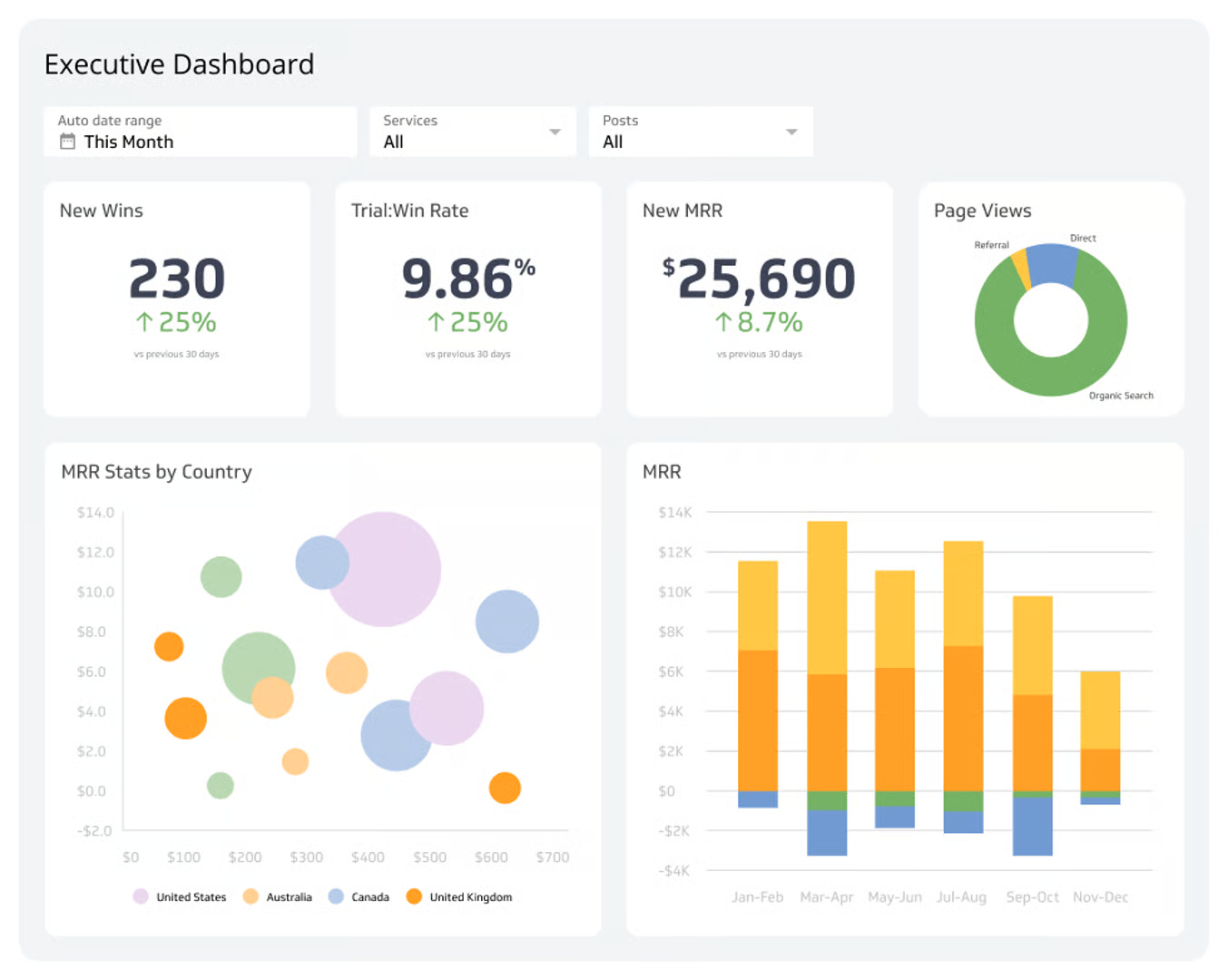
An executive dashboard gives a single, easy-to-navigate view of how your company is performing against its strategic goals. Instead of digging through dozens of reports or raw spreadsheets, you can glance at one screen and instantly see what’s working, what’s lagging, and where attention is needed.
What does an executive dashboard typically contain
An effective executive dashboard includes the most important information you need to make meaningful decisions quickly, such as:
- Key Performance Indicators (KPIs). The core metrics that reflect your organization’s success, such as revenue growth, profit margins, customer retention, or employee engagement.
- Financial data. High-level insights into your company’s financial health, including cash flow, expenses, and operating margins.
- Sales and marketing metrics. The overviews of sales performance, pipeline status, campaign ROI, and customer relationship management data.
- Operational insights. Summaries of production, logistics, or service delivery that indicate how efficiently your organization’s resources are being used.
- Forecast and trends. Predictive charts that help the team spot risks and opportunities before they become urgent.
How does an executive dashboard differ from operational and tactical dashboards?
While an executive dashboard focuses on strategy and company-wide performance, operational or tactical dashboards serve a narrower purpose.
- Operational dashboards monitor day-to-day activities, like tracking call center response time and website uptime.
- Tactical dashboards help mid-level managers track departmental goals, such as campaign conversions for marketing or defect rates for manufacturing.
Together, these dashboards provide visibility across the organization. Operational and tactical dashboards keep teams focused on execution, while the executive dashboard connects those moving parts into a single strategic view so leaders understand not just what’s happening, but why it matters.
Dashboards for different leaders
Executive dashboards aren’t one-size-fits-all. A chief executive officer (CEO) might focus on company-wide KPIs such as total revenue, profitability, and market share. A chief financial officer (CFO) would look at a financial dashboard showing forecasts, margins, and expenses. Meanwhile, a chief marketing officer (CMO) pays attention to metrics like brand awareness, campaign performance, and customer acquisition.
Each dashboard pulls from various data sources but presents the information in a way that matches the leader’s focus. This helps every executive quickly spot the insights that matter most to their role and make faster, more data-informed decisions for the business.
Why should leaders use an executive dashboard?
For most leaders, time is limited and decisions carry weight. Centralizing the most important data in one location helps you make smarter decisions that drive the business forward.
Here are some main benefits:
1. Faster, more confident decision-making
An executive dashboard brings together real-time data from multiple sources, so you can see trends as they happen and respond instantly. Instead of waiting for end-of-month reports, you can spot issues like a drop in sales, a spike in costs, or a lag in customer engagement early and act before those problems escalate.
2. A high-level view of business performance
A good dashboard provides a strategic snapshot of your organization’s performance, highlighting both strengths and blind spots. It helps you monitor how the company is tracking toward strategic goals, ensuring that every department, from finance to marketing, stays aligned with the broader business strategy.
3. Stronger cross-department alignment
When each department operates in its own silo, it’s easy for teams to lose sight of how decisions in one area affect another. A centralized management dashboard acts as the thread connecting your departments, showing the interaction between sales, operations, and financial data, and ensuring everyone is working toward the same outcomes.
4. Improved accountability and transparency
With an executive dashboard, you can track performance metrics and hold teams accountable for progress. Employees, on the other hand, can see exactly how their work contributes to company goals. That level of transparency drives engagement and builds a sense of shared responsibility.
5. Real-time insights for better strategic planning
An executive dashboard is how leaders stay connected to what’s happening right now. By pulling live information from trusted data sources, it turns raw data into real-time insight, helping you see performance as it unfolds, spot shifts early, and act before small issues become bigger ones.
Over time, these continuous updates reveal patterns that guide strategic planning, helping you identify opportunities for improvement, allocate resources effectively, and adjust priorities confidently.
Read: Data Analytics Team Structure: A Practical Guide to Building a Data-Driven Organization
Core metrics to include for executives
To get value from an executive dashboard, the data you track has to reflect your organization’s priorities. The right metrics help you see the big picture and the finer details that influence it.
Here are some metrics to track in your executive dashboard:
1. Financial and revenue metrics
Financial metrics give you a clear view of your company’s financial health and stability. Examples include:
- Annual Recurring Revenue (ARR). Shows predictable, recurring income from subscriptions or contracts, which is a crucial measure for growth-oriented businesses.
- Cash flow. Tracks how money moves in and out of the organization, helping executives ensure liquidity and plan for future expenses.
- Profit margin. Reflects how much profit your company retains after all costs are paid, which is a quick gauge of efficiency and sustainability.
- Operating expenses. Highlights spending across departments to identify areas for improvement or cost optimization.
These financial dashboard elements help CFOs and other leaders see whether the business is profitable, solvent, and on track toward its company goals.
2. Growth and acquisition metrics
If your goal is to scale, growth metrics show how effectively your company is attracting and retaining new customers or users. Here are some growth metrics to pay attention to:
- Customer Acquisition Cost (CAC). The total cost of acquiring a single customer, including marketing and sales expenses.
- Customer Lifetime Value (LTV). The total revenue your business can expect from a customer over their entire relationship with the company.
- Monthly Active Users (MAU) or New signups. A measure of your market reach and engagement, especially with digital businesses.
- Revenue growth rate. Tracks the pace at which the company’s income is increasing over time.
These KPIs give teams visibility into whether growth strategies are paying off and if marketing or product investments are delivering results.
3. Operational efficiency
An executive dashboard can also reflect how efficiently your organization is using its resources. Operational metrics like the ones below track performance across departments.
- Operating costs. The total expenses tied to day-to-day operations for the business.
- Customer churn rate. The percentage of customers who stop doing business with the company.
- Employee utilization rate. The ratio of billable to available work hours for employees (which is useful in service-based or project-heavy organizations).
- Average resolution time. For support teams, this measures how quickly issues are resolved to gauge both efficiency and customer experience.
With these insights, you can pinpoint inefficiencies and make informed decisions about staffing, workflow, or automation.
4. Marketing and sales funnel
Understanding how effectively your sales and marketing teams work together to drive growth is essential to breaking down any silos that may be forming. A dedicated dashboard section can help you visualize funnel performance from awareness to conversion using these metrics:
- Top-of-funnel leads. The number of new prospects entering the funnel, showing marketing reach and campaign success.
- Lead-to-customer conversion rate. The percentage of leads that convert into paying customers shows how effectively your reps are converting leads.
- Average deal size. Reflects the typical value of closed deals, which helps leaders with forecast revenue.
- Sales cycle length. The average time it takes to close a deal: shorter cycles often signal better alignment between marketing and sales teams.
These performance metrics help chief marketing officers (CMOs) and sales leaders identify viable opportunities and pinpoint areas where the funnel may be leaking.
5. Risks and leading indicators
Beyond measuring progress, an executive dashboard should help you anticipate challenges. These risk and early-warning metrics provide actionable insights before problems escalate.
- Risk alerts: Automated signals that highlight anomalies or sudden changes in business data, such as unexpected expense spikes.
- Trend deviations: Visual indicators that show when actual results diverge from forecasts, which prompts a deeper investigation.
- Customer Satisfaction Scores or Net Promoter Score (CSAT/NPS). Early signs of customer sentiment that often predict future churn or growth.
- Employee turnover rate: Measures how often employees leave your company over a set period, which is a key signal of culture, engagement, and organizational health.
How to build an executive dashboard
Here’s a practical, step-by-step framework to build an executive dashboard that provides a bird’s-eye view of your company’s operations.
Step 1: Define the purpose and audience.
Start by clarifying why you’re building the dashboard and who it’s for.
Is it for the CEO, CFO, or executive team? What key decisions should it inform: revenue planning, operational efficiency, or marketing performance?
When you’ve gotten your answer, set 3–5 SMART goals (e.g., “reduce reporting time by 40% in the next three months,” “spot revenue dips weekly”). This alignment will guide every design and data choice.
Step 2: Identify core metrics and data sources.
Next, choose your core metrics and data sources, depending on who the dashboard is for.
For instance, when creating a dashboard for your CMO, you can include core metrics like CAC, CLV, conversion rate, and marketing ROI. You can obtain this information from various sources, including analytics software like Google Analytics 4 (GA4) and Google Search Console, CRMs like HubSpot and Salesforce, and marketing automation tools like Marketo and Pardot.
But if the dashboard is for a CFO, your metrics should include revenue growth rate, gross and net profit margins, operating cash flow, and EBITDA. And your data sources could include ERP systems like Oracle and SAP, accounting software like QuickBooks and Xero, and business intelligence (BI) platforms like Tableau or Microsoft Power BI.
Step 3: Design the data flow and integrations.
Once you’ve defined your metrics and data sources, map out how information will move from those systems into your dashboard. The goal is to make the flow seamless, so centralize everything in a data warehouse (such as Snowflake or BigQuery), so your dashboard pulls from a single, reliable source of truth.
Automate data updates wherever possible to keep your real-time insights accurate and consistent. The smoother your integrations, the less time you’ll spend chasing errors or rebuilding broken reports.
Step 4: Keep the design simple and intentional.
A great dashboard should make sense at a glance. Group metrics by theme—financial, marketing, operations, or people—so executives can navigate easily. Place your most important KPIs (like revenue, cash flow, or churn) at the top, followed by supporting metrics that add context.
Use visuals and color only to guide attention, not overwhelm it. For example, reserve bold colors for significant changes or risks, and keep the rest clean and consistent. This helps leaders focus on what matters.
Step 5: Add interactivity and alerts that matter.
Executives should be able to explore data when they need to. So, add simple filters for date, region, or department so leaders can easily find the information they’re looking for.
Also, set up threshold-based alerts for critical metrics, like a drop in pipeline coverage or a sudden rise in churn. These real-time signals help executives act before problems escalate, keeping decision-making proactive instead of reactive.
Step 6: Test, refine, and align with executives.
Before rolling your dashboard out company-wide, share an early version with your executive team. Watch how they use it: what they click on, what they ignore, and where they hesitate. These patterns reveal what’s intuitive and what’s not.
Refine the dashboard based on feedback, simplify where needed, and adjust the layout to match how leaders actually think. This collaborative step is what transforms your dashboard from a nice-to-have tool into something executives rely on daily.
Step 7: Automate, maintain, and review regularly.
An executive dashboard isn’t a “set it and forget it” system. It should evolve with your business. So, automate data refreshes to keep information current, and schedule quarterly reviews to revisit KPIs and confirm they still reflect company priorities.
Assign clear ownership (typically to a data analyst, marketing analyst, or CMO) to maintain data accuracy and oversee updates. This consistent upkeep ensures your dashboard remains a trusted source of truth and a core part of your organization’s performance routine.
Executive dashboard design best practices
When designing your executive dashboard, keep three things in mind: it should reduce cognitive load, highlight key data, and make insights easy to understand.
To ensure your dashboard fulfills these three criteria, here are some best practices to guide your dashboard design:
1. Simplicity and focus (“less is more”)
An executive dashboard shouldn’t show everything; it should show what matters most. So, focus on the KPIs that directly support your business goals, and refrain from using too many charts or widgets that can overwhelm users, blur priorities, and make the data harder to act on.
- Stick to one main focus per view—for example, business health, financial trends, or sales pipeline.
- Use plain labels and clear numbers instead of jargon or complex formulas.
- If an insight doesn’t influence decision-making, it doesn’t belong on the main screen.
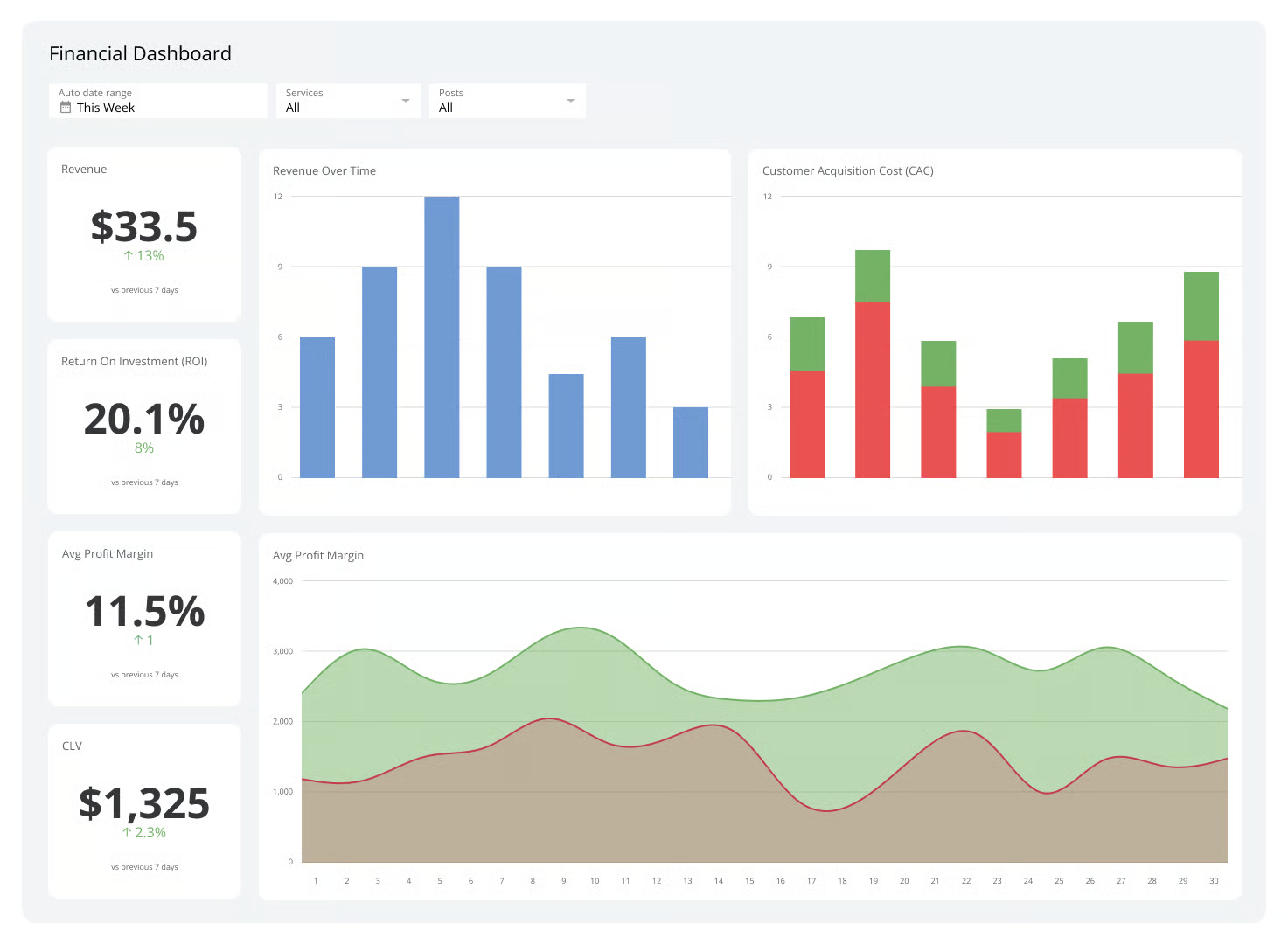
Financial dashboard showing only essential KPIs. Source
2. Visual hierarchy and layout
The way information is arranged in your dashboard determines how quickly someone can find what they need. A well-structured executive dashboard guides the eye naturally, left to right, top to bottom—just like reading a page.
- Place your most important KPIs, such as revenue, cash flow, or customer churn, at the top where they’re instantly visible.
- Use the middle and lower sections for supporting visual trends, comparisons, or detailed breakdowns.
- Group related metrics by theme (for example, financial, marketing, or operations) and keep chart types consistent so comparisons make sense at a glance.
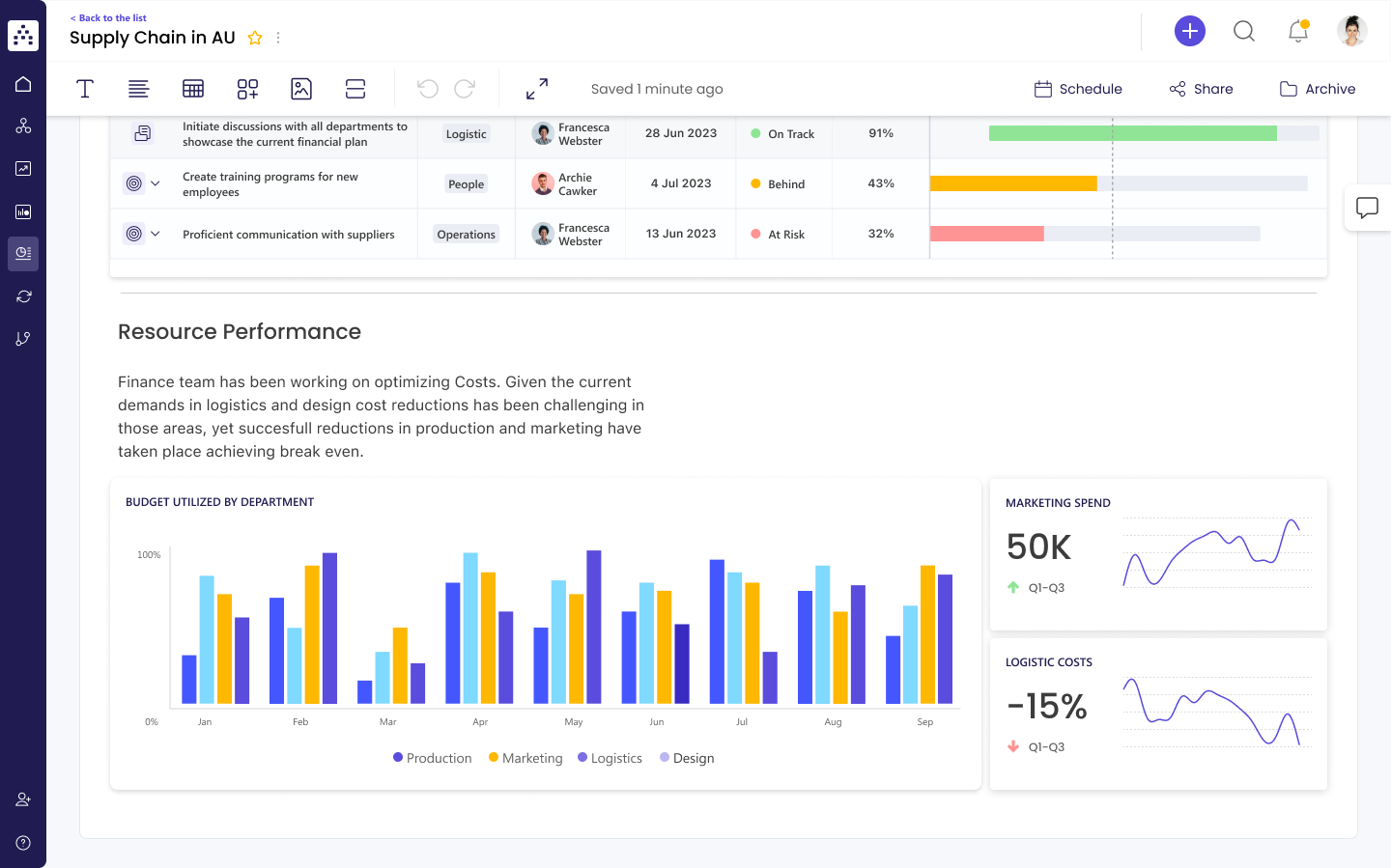
A dashboard showing a clear visual hierarchy: performance metrics at the top and supporting charts below. Source
3. Use color, thresholds, and alerts.
Color in an executive dashboard should communicate meaning, not decorate. Executives should be able to spot success or risk instantly without scanning through every number.
- Use color intentionally: for example, green for good, yellow for caution, and red for issues.
- Add thresholds or target lines to show when performance meets, exceeds, or falls below a goal.
- Keep backgrounds neutral so accent colors guide attention to what matters most.
- Set up automatic alerts for anomalies, like revenue dips or cost spikes, so the executive team can act quickly.
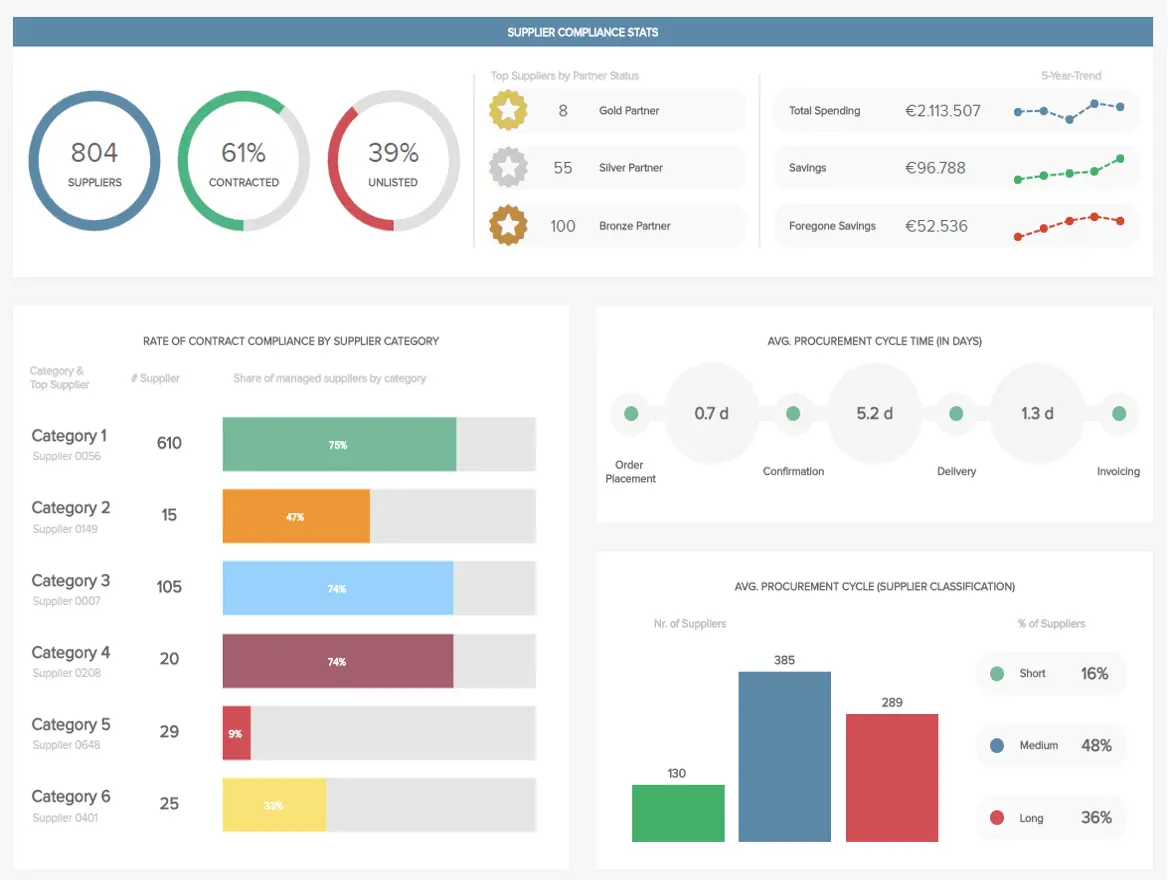
4. Interactivity and drill-down
While simplicity is crucial, a great executive dashboard also gives leaders the ability to explore data deeper when needed.
- Add filters for date, region, or department to enable users to view performance across different parts of the organization.
- Allow click-throughs from high-level KPIs to supporting management dashboards or detailed reports, so every number tells a full story.
- Use tooltips or hover effects to display extra context without cluttering the main view.
And always keep the layout intuitive. An easy-to-navigate format ensures executives can quickly find insights without technical help.
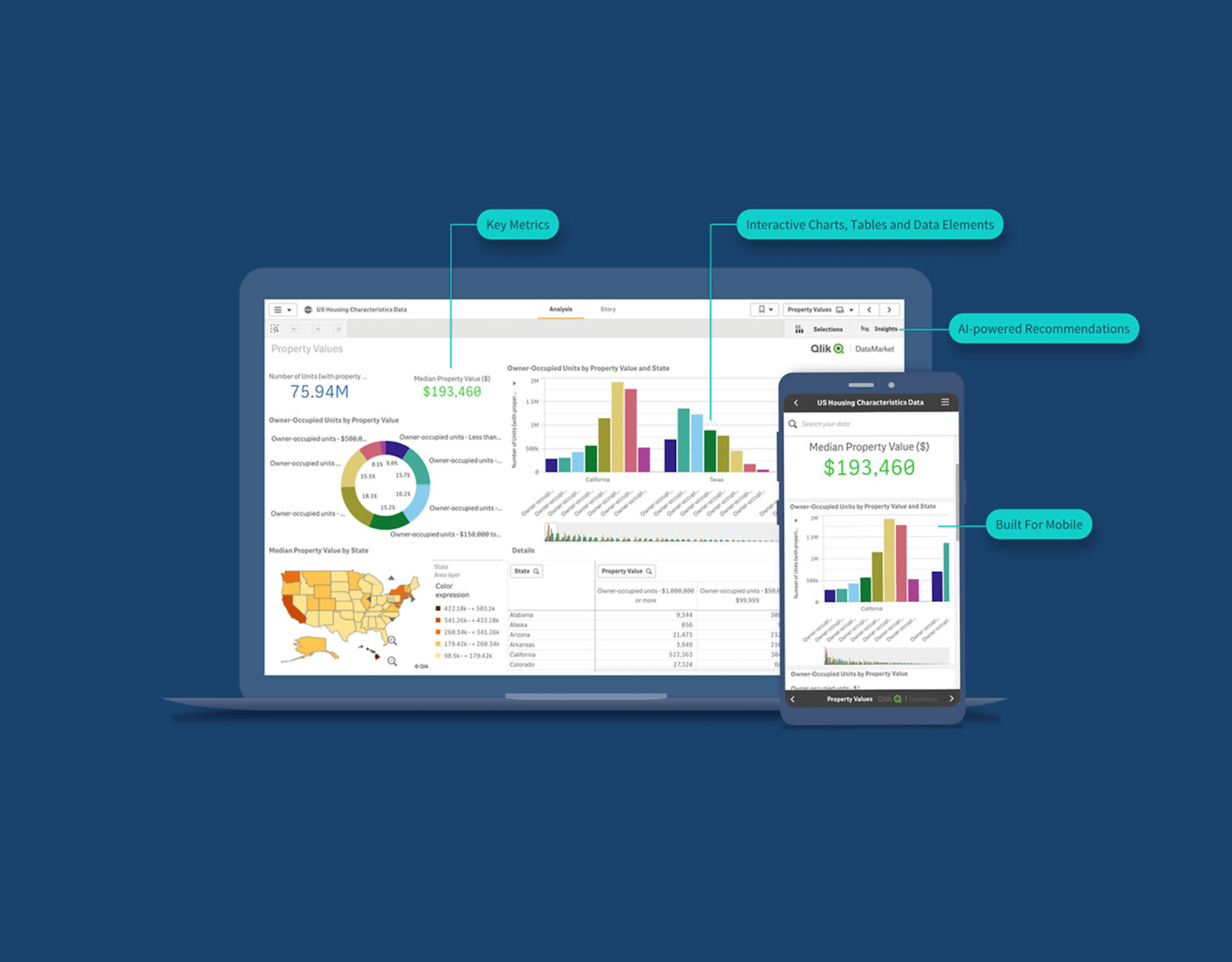
5. Real-time vs. periodic updates
Not every executive dashboard needs live data streaming around the clock. Some metrics shift hourly, while others only change meaningfully once a week or month.
- Use real-time data for fast-moving indicators like daily sales, website traffic, or customer support volume, where immediate visibility enables quick action.
- For slower-changing metrics such as financial reports, business performance summaries, or strategic dashboards, periodic updates (weekly or monthly) work best. They provide stability and help executives focus on meaningful trends instead of constant fluctuations.
- Always show the last updated date clearly, so leaders know how current the insights are. Automate your data refresh schedules to minimize manual effort and keep the dashboard reliable over time.
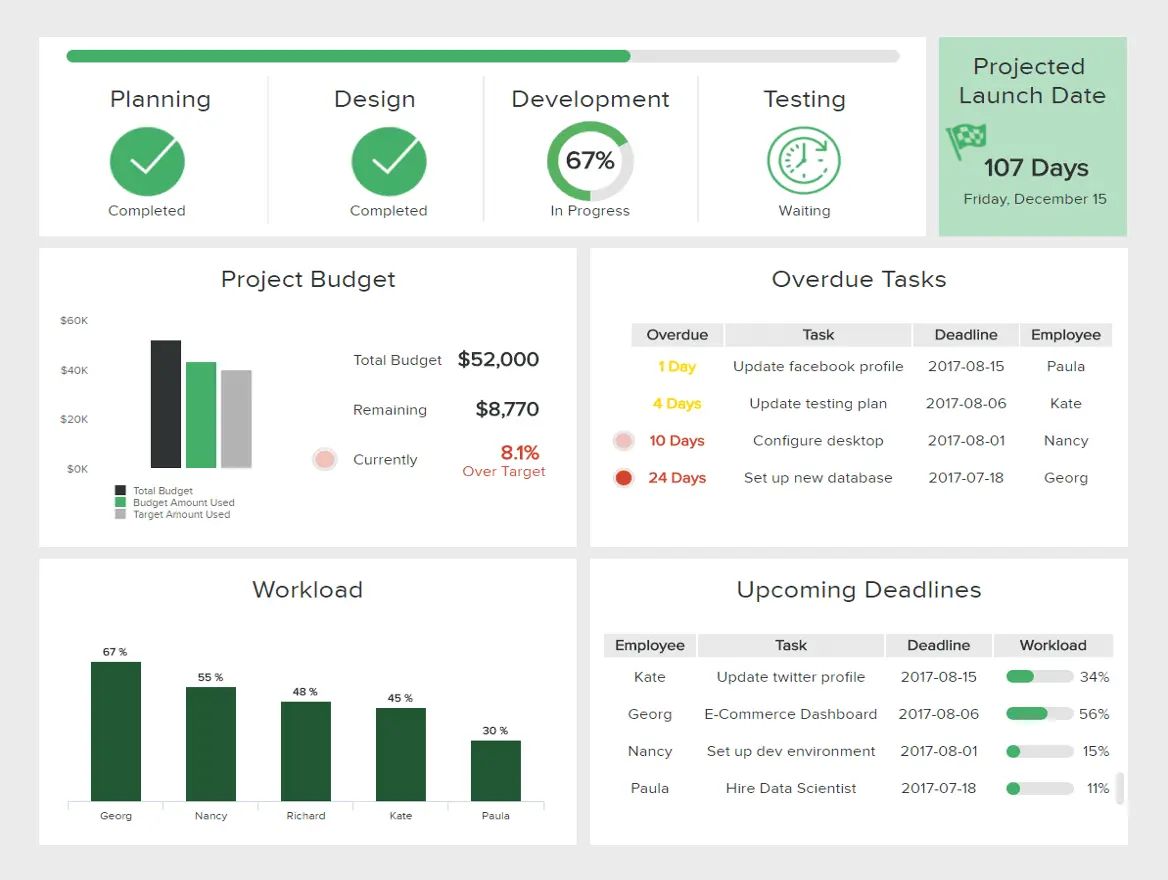
A dashboard example showing time-based metrics and scheduled updates. Source
Data integration and technical setup
To deliver reliable real-time insights, your system needs to pull, clean, and unify information from various sources, finance tools, CRMs, marketing platforms, and operations systems.
Here’s how to set that up properly:
1. Choosing data sources and integrations
Start by identifying the data sources that hold the information your executives care about most. These might include:
- Financial systems (like QuickBooks, NetSuite, or Xero) for financial insights, margins, and expenses.
- Sales and CRM platforms (like Salesforce or HubSpot) for pipeline, deal velocity, and customer relationship management metrics.
- Marketing tools (like Google Analytics or HubSpot Marketing Hub) for lead generation and campaign ROI.
- HR or workforce systems (like BambooHR or Workday) for headcount, engagement, and turnover.
Connect these through native integrations or middleware tools such as Fivetran, Stitch, or Zapier. This way, you can consolidate everything into a central data warehouse, like Snowflake, BigQuery, or Amazon Redshift, which becomes the single source of truth for your dashboard.
Pro tip. Before connecting, confirm that each tool exports clean, consistent identifiers (e.g., customer ID, date format, region). That consistency will save you hours later when combining various sources.
2. Automation, refresh cadence, and latency
Executives need real-time data when it matters, but not every metric has to be updated every minute. You’ll get better performance and reliability if you tailor refresh schedules by data type.
- Real-time feeds work best for sales performance, web traffic, or support queues that change minute by minute.
- Daily or weekly loads are often sufficient for financial dashboards or HR summaries, where accuracy matters more than speed
- Set up automated refresh jobs using your BI (business intelligence) or ETL (Extract, Transform, Load) platform. Tools like Power BI, Tableau, or Looker can schedule these updates and alert you if a pipeline fails.
Clear refresh rules reduce latency—the delay between when an event occurs and when it appears on your dashboard—ensuring executives always work from up-to-date information.
3. Data transformation and normalization
Data from multiple sources rarely lines up neatly. Standardizing and cleaning this information ensures your metrics stay consistent and comparable across systems.
- Normalize fields. Align formats for things like dates, currencies, and naming conventions (e.g., “US” vs. “United States”).
- Clean duplicates. Merge or filter duplicate entries before they reach the dashboard.
- Create unified dimensions. Standardize shared categories such as “Region,” “Product,” or “Segment.”
- Model your KPIs. Build transformation scripts or dbt models (a SQL-based data transformation file used to clean and structure raw data in your warehouse) that calculate success metrics (e.g., ARR, churn rate) once, so every report references the same definition.
This consistency ensures that when two departments discuss “revenue,” they’re talking about the same number.
4. Governance, version control, and documentation
For your project dashboard to stay reliable, it needs structure. Strong data governance keeps information accurate, secure, and easy to maintain.
- Governance. Assign data owners for each department or dataset who will be responsible for accuracy, compliance, and access rights.
- Version control. Store your transformation scripts or data models in Git or another repository so changes are transparent and reversible.
- Documentation. Maintain a shared data glossary and dashboard guide that defines every metric, data system, and refresh schedule. This helps new users understand how to interpret the visuals and where the insights come from.
- Access management. Use role-based permissions to ensure sensitive financial data is visible only to authorized corporate officers.
Read: Top Marketing Attribution Tools in 2025
Common pitfalls and how to avoid them
When creating an executive dashboard, it’s easy to focus on trivial things like focus or data volume and lose sight of what really matters: clarity and alignment. Here are some common pitfalls and how you can avoid them.
1. Overloading with vanity metrics
It’s tempting to fill the dashboard with every available chart or KPI. But when everything looks important, nothing truly is. Vanity metrics, such as social followers, impressions, or page views, may appear impressive but often don’t directly correlate with business goals or business performance, so they shouldn’t be in the dashboard.
How to avoid this:
Start with your team’s top five decisions or focus areas. Choose metrics that directly affect those outcomes (for example, revenue growth, customer retention, or margin improvement). Review the dashboard quarterly to retire low-impact visuals.
2. Inconsistent definitions or data issues
If “revenue” means one thing in finance and another in sales, your executive dashboard will create confusion instead of alignment. Similarly, if your data feeds are inconsistent, outdated, or poorly integrated, even the most aesthetic charts will lead to bad decisions.
How to avoid this:
Create a shared data glossary and maintain documentation for every metric and data input. Use data transformation steps to standardize names, date formats, and calculations, and schedule regular data-quality audits to ensure accuracy and consistency.
3. Neglecting executive user feedback
Dashboards built in isolation (without stakeholder input) rarely deliver what leaders truly need. If they can’t find information quickly or the interface feels clunky, they’ll stop using it, no matter how good the data is.
How to avoid this:
Involve executives early in the design process. Test early versions with small teams, watch how they navigate them, and refine the layout accordingly. Keep the easy-to-use interface principle in mind so executives can find vital metrics in under 30 seconds.
4. Static dashboards that don’t evolve
Over time, company goals, strategies, and systems evolve, but many dashboards stay frozen, showing outdated or irrelevant metrics.
How to avoid this:
Assign ownership, set quarterly reviews, and measure adoption. Add new key features or remove old ones as the business shifts. Also, encourage data-informed decisions by keeping real-time insights fresh and relevant.
5. Ignoring context or storytelling
Data without context forces executives to interpret numbers on their own, and not everyone draws the same conclusion. A dashboard that just dumps reports or figures lacks the narrative that drives informed decisions.
How to avoid this:
Add annotations, color-coded targets, and trend indicators to clarify what’s happening. Use concise labels like “up 12% vs. last quarter” to tie metrics directly to business context. This helps transform numbers into insights executives can act on.
6. Focusing on design over usability
It’s easy to get carried away with sleek visuals or complex interactive dashboards, but too much motion or visual clutter can slow comprehension and frustrate users.
How to avoid this:
Prioritize clarity over flair. Use color only to indicate meaning, and maintain a clean, easy-to-navigate format. Each design choice should help executives answer a specific question faster, not distract from it.
When to choose MarketerHire
Building and maintaining an executive dashboard takes more than just tools. It requires strategic thinking, technical skill, and a clear understanding of how data drives growth. With MarketerHire, you can bring in a fractional CMO to shape strategy, or a marketing analyst to ensure your data, metrics, and dashboards tell a clear, accurate story.
Here’s how we can help:
1. When you lack in-house analytics capacity
If your marketing or leadership team doesn’t have someone who can translate business data into actionable insights, it’s time to bring in help. A fractional CMO from MarketerHire can assess your existing management dashboards, identify the KPIs that matter, and help your team make data-driven decisions.
A marketing analyst can complement that by digging deeper into financial insights, customer trends, and campaign results to extract insights that will inform your business strategies.
2. When you need to build, audit, or scale dashboards quickly
Sometimes, you don’t have months to hire full-time talent or build an analytics team from scratch. When you need to execute a project fast, a fractional CMO can step in to design or refine your executive dashboard.
They can collaborate with your marketing, finance, and operations teams to connect data systems, surface real-time insights, and turn complex numbers into a clear story about your company’s performance.
3. When you want flexible expertise without the long-term commitment
Hiring a full-time CMO or analytics leader isn’t always realistic, especially for growing startups or mid-sized companies that have tight budgets. MarketerHire lets you access senior marketing leadership on demand, without the overhead.
Our fractional CMOs and marketing analysts work flexibly, so if you want to hire them only to build an executive dashboard, you can. And if you want to hire them on a long-term basis, they’ll be available, too. With MarketerHire, you can scale up or down as needed.
Once you share your business needs, MarketerHire can match you with the right expert in as little as 2–3 days. You can start with a two-week trial, and if the first match isn’t the right fit, we’ll rematch you with another expert at no cost.
Read: Marketing Analytics Team Structure: Key Roles for Scalable Success
Elevate your strategy with smarter dashboards
Great dashboards not only report on the past, but they also shape what happens next. They turn data into direction, aligning leaders and teams around what truly drives performance. When built and maintained well, an executive dashboard becomes the control center for smarter strategy, faster action, and measurable growth.
If you don’t have the in-house expertise to make that happen, MarketerHire can help. Our pre-vetted fractional CMOs and marketing analysts bring the right mix of strategy and execution, connecting multiple data sources, ensuring accuracy, and designing dashboards that turn insights into impact.
To get matched with a fractional CMO or marketing analyst, reach out to us today.
